
Introduction
In my final year of engineering, I built watbot — a voice-enabled Android chatbot powered by IBM Watson AI services. In this post I’ll walk you through how I built it and what I learned.
The project is fully open source: github.com/vivekpanchal/watbot
What is IBM Watson?
IBM Watson is a suite of AI services hosted on IBM Bluemix (now IBM Cloud). For this project I used three services:
- Watson Conversation (now Watson Assistant) — The brain. You train it with intents and entities to understand natural language.
- Watson Speech-to-Text — Converts spoken audio from the microphone into text.
- Watson Text-to-Speech — Converts the chatbot’s text response back into spoken audio.
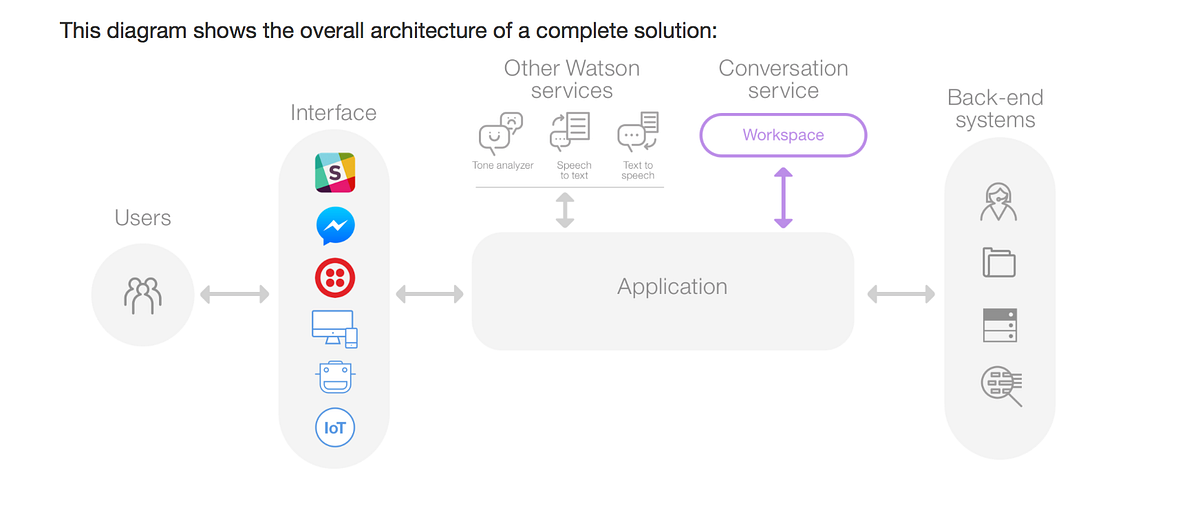
Architecture
User speaks → STT → Watson Assistant → TTS → User hears
                         ↕
                  Conversation context
The Android app:
- Records audio via the microphone
- Streams it to Watson STT → receives transcribed text
- Sends the text to Watson Assistant → receives a response
- Sends the response to Watson TTS → receives audio
- Plays back the audio to the user
Setting Up IBM Bluemix
- Create a free IBM Bluemix account at cloud.ibm.com
- Create three service instances: Watson Conversation, STT, and TTS
- Copy the credentials (username, password, URL) for each service
Training the Watson Conversation Service
Before coding the app, you need to train the Watson Assistant via the web UI:
- Create a new Workspace
- Define Intents — the purpose of user messages (e.g.,
#greeting,#weather,#goodbye) - Define Entities — key values within messages (e.g.,
@city,@date) - Build a Dialog tree — the conversation flow with conditions and responses
For my project I built a general-purpose assistant that could handle greetings, FAQs, and basic information requests.
Android Implementation
Dependencies
Add the Watson Android SDK to your build.gradle:
implementation 'com.ibm.watson.developer_cloud:android-sdk:0.5.0'Speech-to-Text
SpeechToText sttService = new SpeechToText();
sttService.setUsernameAndPassword(STT_USERNAME, STT_PASSWORD);
sttService.setEndPoint(STT_URL);

RecognizeOptions options = new RecognizeOptions.Builder()
    .contentType(HttpMediaType.AUDIO_WAV)
    .model("en-US_BroadbandModel")
    .interimResults(true)
    .build();

sttService.recognizeUsingWebSocket(audio, options, new BaseRecognizeCallback() {
    @Override
    public void onTranscription(SpeechResults speechResults) {
        String transcript = speechResults.getResults().get(0)
            .getAlternatives().get(0).getTranscript();
        sendToWatson(transcript);
    }
});
Watson Conversation
Conversation conversationService = new Conversation("2017-05-26");
conversationService.setUsernameAndPassword(CONV_USERNAME, CONV_PASSWORD);

MessageInput input = new MessageInput.Builder()
    .text(userMessage)
    .build();

MessageOptions options = new MessageOptions.Builder(WORKSPACE_ID)
    .input(input)
    .context(context) // maintain conversation state
    .build();

MessageResponse response = conversationService.message(options).execute();
String replyText = response.getOutput().getText().get(0);
context = response.getContext(); // save context for next turn
Text-to-Speech
TextToSpeech ttsService = new TextToSpeech();
ttsService.setUsernameAndPassword(TTS_USERNAME, TTS_PASSWORD);

SynthesizeOptions ttsOptions = new SynthesizeOptions.Builder()
    .text(replyText)
    .voice(SynthesizeOptions.Voice.EN_US_MICHAEL)
    .accept(HttpMediaType.AUDIO_WAV)
    .build();

InputStream audio = ttsService.synthesize(ttsOptions).execute();
playAudio(audio);
Challenges I Faced
- Threading — All network calls must be off the main thread. I used
AsyncTask(now replaced by Kotlin Coroutines). - Microphone permissions — Android 6+ requires runtime permission for
RECORD_AUDIO. - Conversation context — You must pass the context object back with each message to maintain conversation state.
- Audio formats — Watson STT requires specific audio formats (WAV/PCM 16kHz works best).
What I Would Do Differently Today
If I were rebuilding this today with modern Android:
- Kotlin instead of Java
- Kotlin Coroutines for async operations
- ViewModel + LiveData for state management
- Watson Assistant v2 API (the newer, more capable version)
- Hilt for dependency injection
Conclusion
Building this chatbot taught me more about Android, networking, and AI services than any tutorial could. The key lesson: just build things. Even if they’re imperfect, you’ll learn far more from a real project than from passive learning.
The full source code is available on GitHub: github.com/vivekpanchal/watbot